
I spent three months watching AI coding agents fail the same way.
Not fail catastrophically. Fail quietly. An agent that writes two files, declares success, exits code 0, and leaves you with a broken test suite. An agent that rewrites the same function three times across three retries because nobody gave it the context from attempt 1. An agent that stops making progress at 11pm and sits there, token-burning, while you're asleep.
I was building agentic systems for production, the kind where you can't babysit every run. The tools were good at writing code. They were bad at finishing the job.
So I built The Architect. It's an open-source autonomous development lifecycle layer that wraps Claude Code or OpenCode and adds everything they're missing: planning, completion verification, retry intelligence, quality review, and persistent memory. It's on PyPI. It shipped itself. And I'm going to explain every mechanism in it, because the problems it solves are real and the solutions aren't obvious.
github.com/iNetanel/the-architect
The Problem: You Are the Orchestration Layer
Here's what using Claude Code directly looks like on a multi-task goal.
You write a goal. You start Claude Code. The agent runs. Twenty minutes in, it's rewriting the same function for the third time with no explanation why. You kill it. You retry with adjusted context. It exits code 0. You check the tests. They fail. The completion was a hallucination. You re-prompt, manually carrying the relevant context from the failed attempt. You wait. You check again.
You repeat this for each task. By task 7, you're tired. Task 9 ships with a known edge case because it's 1am and you need to sleep.
Active supervision: 3-4 hours for a 10-task goal. Most of that time is watching, not thinking. You're not writing architecture decisions. You're catching stuck loops.
This is the orchestration problem. Claude Code solves the coding problem. Nobody solved the orchestration problem.
The gap shows up in four specific places:
1. Completion isn't verified. The agent says "task complete." It means nothing. Exit code 0 means nothing. The agent hallucinates completion routinely, writes partial output, declares done, moves on. You have to check.
2. Retries have no memory. When a task fails and you retry, the new attempt starts cold. It doesn't know what attempt 1 tried, what broke, what files were written. It repeats the same mistake.
3. There's no stuck detection. An agent that's genuinely blocked will keep trying and keep burning tokens until you manually intervene. There's no mechanism that says "this is the same failure three times, stop and do something different."
4. Context resets every session. Every time you start a new session, you re-explain the project. The constraints. The decisions already made. The lessons from last week's failed run. There's no memory.
The Fake Solutions
Before building The Architect, I tried the obvious fixes. They don't work at scale.
Better prompts. You spend two hours crafting a perfect system prompt. It helps for one session. Then you change the goal, the codebase evolves, or the model gets a new version. Your carefully tuned prompt is now partially wrong. You're back to babysitting because prompts don't adapt to the state of your project. A better prompt still can't detect that the agent is stuck, can't carry context between retries, can't verify completion, and resets completely next session. Prompting is not an orchestration layer.
More expensive models. Claude Opus or GPT-4o is better than Sonnet at following complex instructions. That's real. But you're still supervising. A better model hallucinates completion less often. It doesn't eliminate it. It gets stuck less often. It doesn't detect when it is stuck and recover. It's more capable per token, but you're still paying for every retry, every stuck loop, every session restart where it re-reads your entire codebase from scratch. And for pure QA, running the retrospective review, verifying test output, catching edge cases the build agent missed, spending Opus-level pricing is expensive quality assurance that still requires your eyes on the output.
The real problem isn't model capability. It's that you can't hand off control without losing control. You can't walk away from an expensive model run because there's nothing to catch it when it goes wrong at 2am. You either pay attention or you pay for chaos.
The Architect is the handoff mechanism. You stay in control: you define the architecture, the goal, the scope. The Architect executes it and handles every failure mode that would otherwise require your intervention.
The Architect fixes all four root problems. Here's how each mechanism works.
The Problem Nobody Talks About: Production Codebases
Everything above assumes you're building something new. Greenfield. A fresh repo with no users, no dependencies that can't change, no decisions baked into the code from 18 months of iteration.
Greenfield with AI agents is easy. You describe a goal, the agent builds it, you review the output. If it goes sideways, you delete the branch and start over. The cost of a wrong decision is low.
Production codebases are completely different. And this is where most AI coding tools silently fail.
In a real product, one with users, with data in production, with a team that has made hundreds of design decisions you didn't document, every agent decision compounds. The agent doesn't know that you chose that specific database schema because of a constraint that came from a compliance requirement in Q3. It doesn't know that the authentication module works the way it does because three different clients have different SSO configurations. It doesn't know that you intentionally left that abstraction loose because you're planning to replace it in the next sprint.
The agent sees the code. It doesn't see the reasoning behind the code.
So it optimises locally. It makes the change that looks right in isolation, and that change conflicts with something three layers deeper. It refactors a function to be cleaner, and breaks a subtle dependency you had on the previous behaviour. It adds a new pattern that's inconsistent with the existing patterns, because it didn't read enough of the codebase to know a pattern existed.
And you can't review every agent decision anymore. That's the whole point of autonomous execution. You're not watching every step. So by the time you look, the damage is already spread across 12 files and two retrospective rounds of fix-up tasks.
This isn't a theoretical concern. I've seen it happen. An agent adds a new API endpoint, correctly wired, correctly tested, and silently changes the error response format across the module to match the new endpoint's pattern. Technically better. But now every client that parses that error format is broken. The tests pass. The retrospective reviewer passes. The change ships.
How The Architect Mitigates This
No tool eliminates this problem completely. That's honest. But The Architect has four specific mechanisms that reduce it substantially.
Persistent memory captures decisions before they're lost. When the build agent discovers a constraint during execution, for example "this module uses a specific error format for legacy client compatibility", it's explicitly instructed to write that to ARCHITECT.md under Known Constraints. The next planning session reads it. The next task file includes it. The next build agent sees it before touching that module. This is how institutional knowledge stops living exclusively in your head and starts living in the project.
The planner runs on a frontier model with full context. Your local Qwen doesn't plan. The architect agent, running on Claude Opus or Gemini 2.5 Pro, reads your ARCHITECT.md, your detected project structure, your dependency graph, and any additional context you provide via --context. It plans with the full picture before decomposing into tasks. This is the moment where cross-cutting concerns, existing patterns, and known constraints get baked into the task files themselves as explicit instructions to the build agent, not as hope that the agent will figure it out.
Scope keeps tasks isolated. A task that touches three components in a monorepo is a task that's likely to produce unintended side effects. At simple scope, the planner creates tasks that are intentionally narrow: one component, one concern, one test surface. This doesn't eliminate cross-component risk, but it makes each change reviewable in isolation and reduces the blast radius of any single agent decision.
You define the architecture, not the agent. This is the hard constraint built into how The Architect works. You set the goal. You choose the scope. You can provide a PRD, a spec, design docs, any context that constrains what the agent should and shouldn't do. The agent plans and executes within that envelope. It doesn't invent architectural direction. If an agent decision during execution conflicts with an existing constraint in ARCHITECT.md, that constraint wins. The agent reads it before starting every task.
The real answer to "how do you use AI agents safely on a production codebase" is: stay at architecture level, and make sure every agent decision is constrained by what you already know. The Architect is built around that principle. You don't review every file change. You review the plan, you seed the constraints, and you let the mechanisms handle execution.
That's a different relationship with the agent than greenfield development. It requires more upfront work in ARCHITECT.md and --context files. It requires thinking carefully about scope. But it's the only way to use autonomous development on a codebase that has real users and real consequences.
The Interactive Flow
The Architect is a terminal application with a full interactive CLI. You don't need to memorise flags. Just run architect in your project directory and it guides you through every step.
The --plan, --goal, --headless flags shown throughout this article are power-user and CI shortcuts. For everyone else, here's what the actual experience looks like.
Screen 1: Provider Selection
If you have more than one AI coding provider installed (Claude Code, OpenCode, Codex), The Architect asks which one to use for this session.
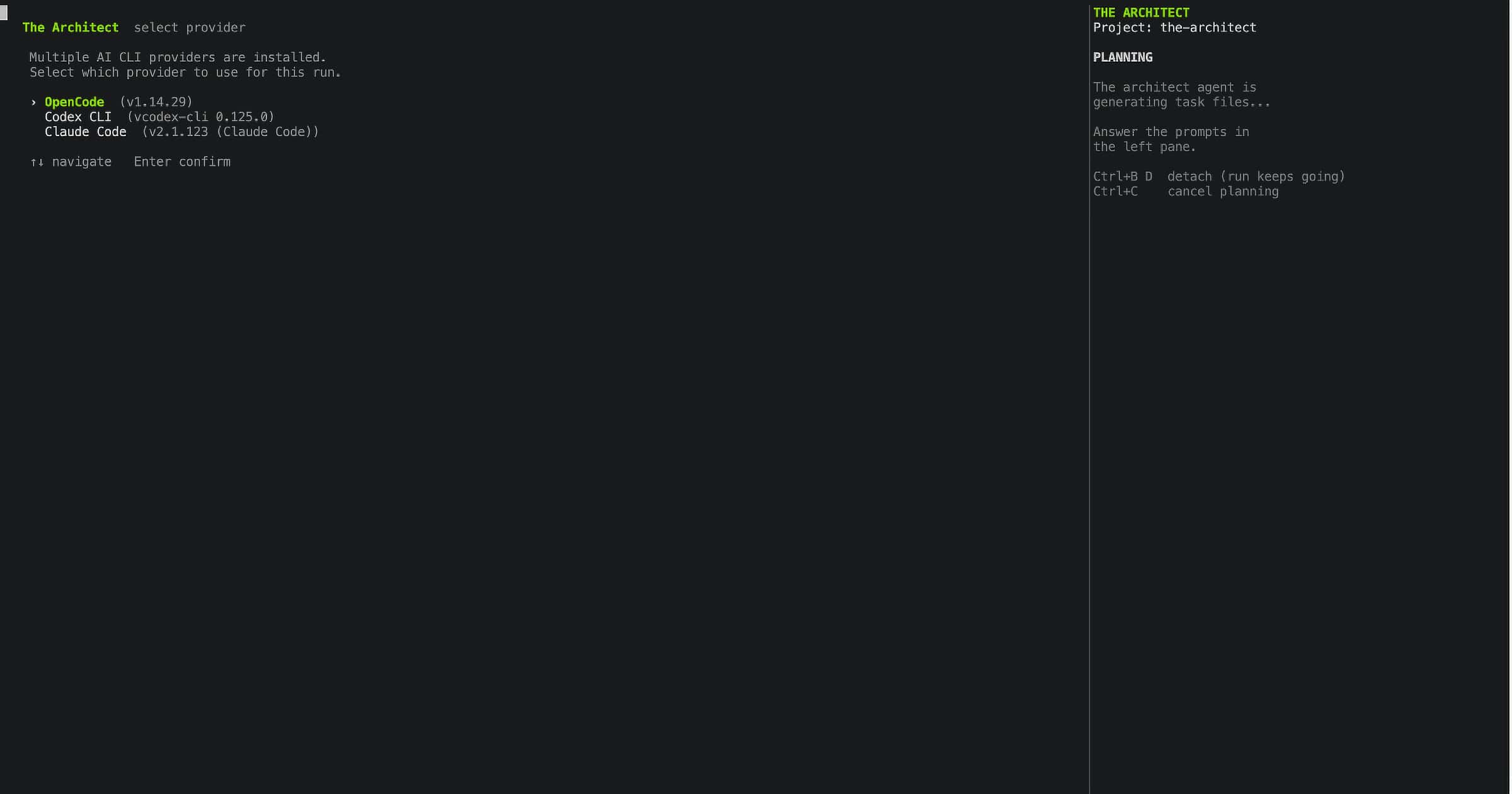
If only one provider is installed, this screen is skipped and The Architect proceeds directly.
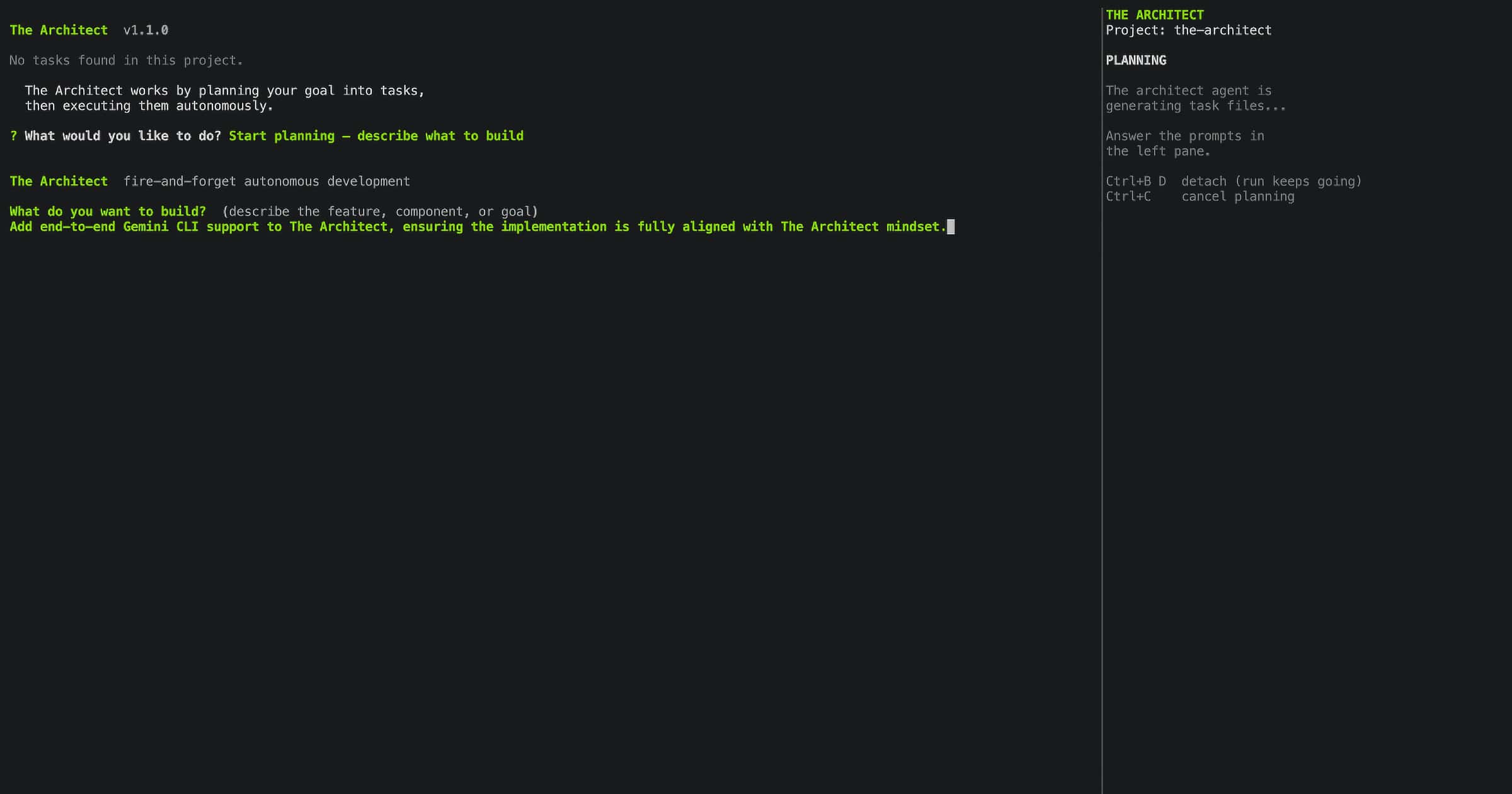
Screen 2: Planning, Your Goal
The planning screen is where you describe what you want to build. You can type your goal directly, or point to a PRD, spec file, or any document with --context. The architect agent reads your input, detects your project structure, and decomposes the goal into numbered task files.
Screen 3: Task Scope Selection
Before the architect agent writes a single task file, you choose how big each task should be. This is one of the most consequential decisions in a run, because it determines whether your execution model can actually handle the work.
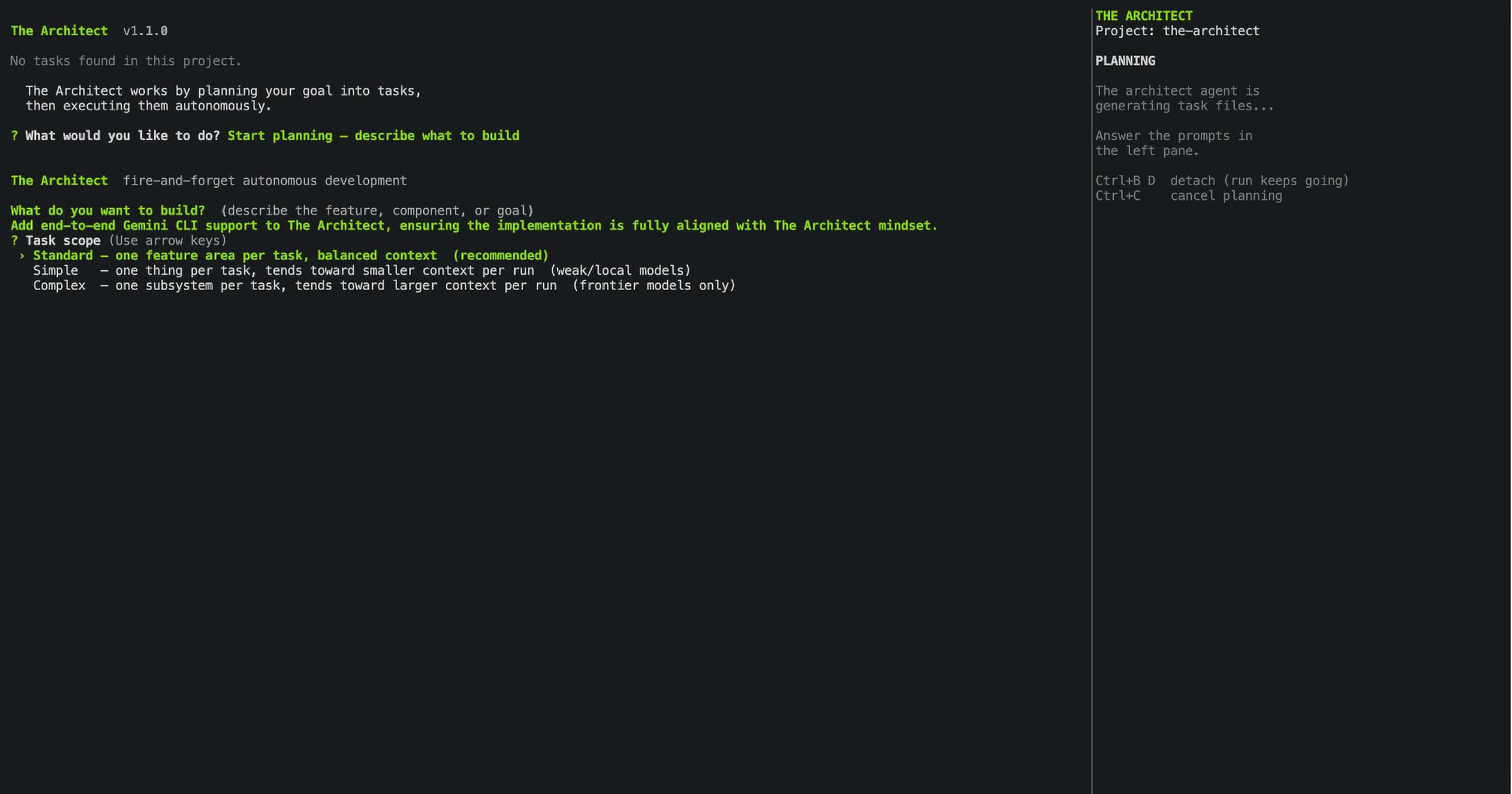
Three options:
Simple — The planner creates 15–20 narrow, focused task files. Each task covers one function, one file, one test surface. Designed for models with context windows up to 100K tokens. Local GPU models like Gemma 4, Qwen 3.6, or any sub-10B model running on your own hardware belong here. The task is small enough that the model is never overwhelmed.
Standard — Medium-sized tasks covering a full feature or component. Typically 8–12 task files for a substantial goal. Designed for models in the 100K–300K context window range, including Claude Haiku, GPT-4o mini, and mid-tier OpenRouter models. Enough breathing room for multi-file changes without losing coherence.
Complex — Broad tasks covering full subsystems or cross-cutting concerns. Typically 3–5 task files for the same goal. Designed for top-tier frontier models with 1M+ context windows: Claude Sonnet, Claude Opus, GPT-4.5, GPT-5, Gemini 2.5 Pro. These models can hold an entire subsystem in context without degrading. Complex scope uses that capacity.
The rule of thumb is simple: match scope to your execution model's reliable context range, not its theoretical maximum. A model rated at 128K tokens has a much smaller reliable working range once you account for the base instruction, files read for context, tool call results, and the response being generated. When in doubt, go one scope smaller than you think you need. A run that finishes on Simple is more valuable than a run that stalls halfway through on Standard.
Getting scope wrong is the most common cause of failed runs. Too broad for the model and it loses track halfway through the task, producing partial output it declares complete. Too narrow and you're running 25 tasks where 8 would do. The scope screen exists so this decision is explicit, not accidental.
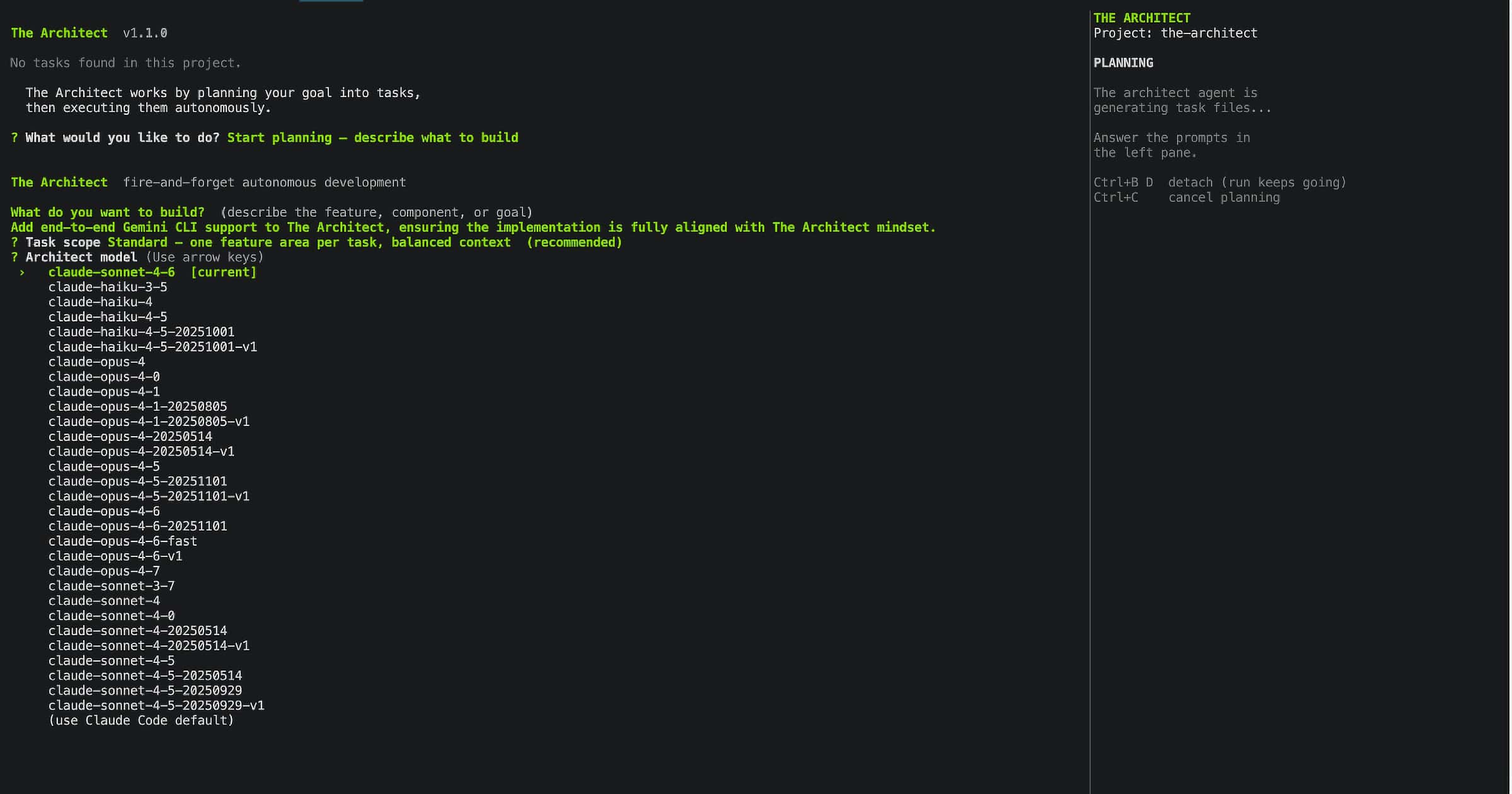
Screen 4: Architect Model Selection
Choose which model runs the planning and retrospective review steps. These are the high-reasoning passes that need the full picture. For execution, a different model can be configured separately.
Screen 5: Feature Selection
Before execution starts, The Architect lets you configure the run: persistent mode (30 retries, 2 retrospective rounds), free tier rotation if you have OpenRouter configured, and an optional token-per-hour budget cap if you want to control overnight spend.
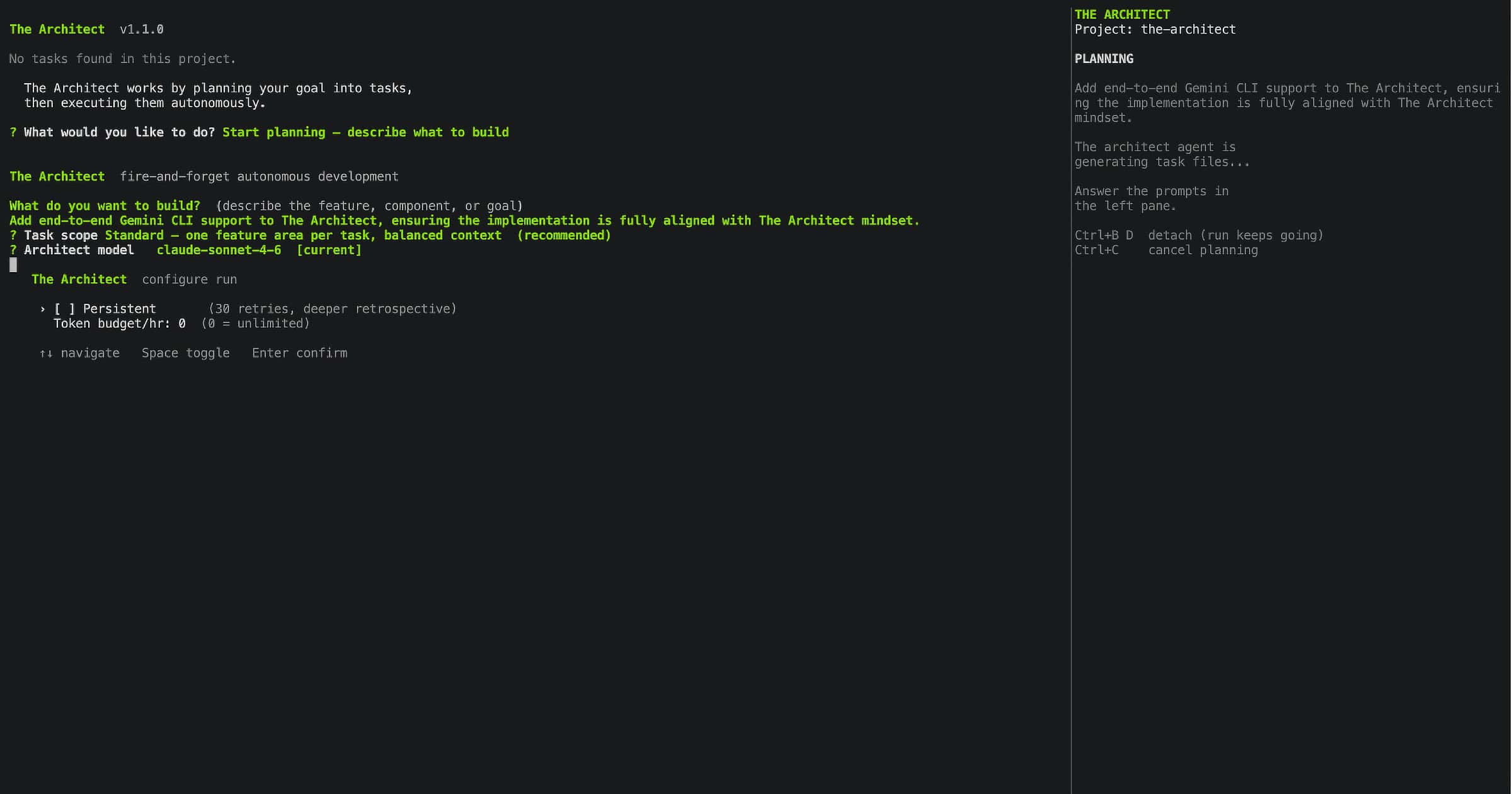
Screen 6: Execution, Real Time
Once configuration is confirmed, execution runs. Every agent action streams live to the terminal: files written, bash commands run, test output, completion signals, retry attempts, circuit breaker state. Nothing is hidden.
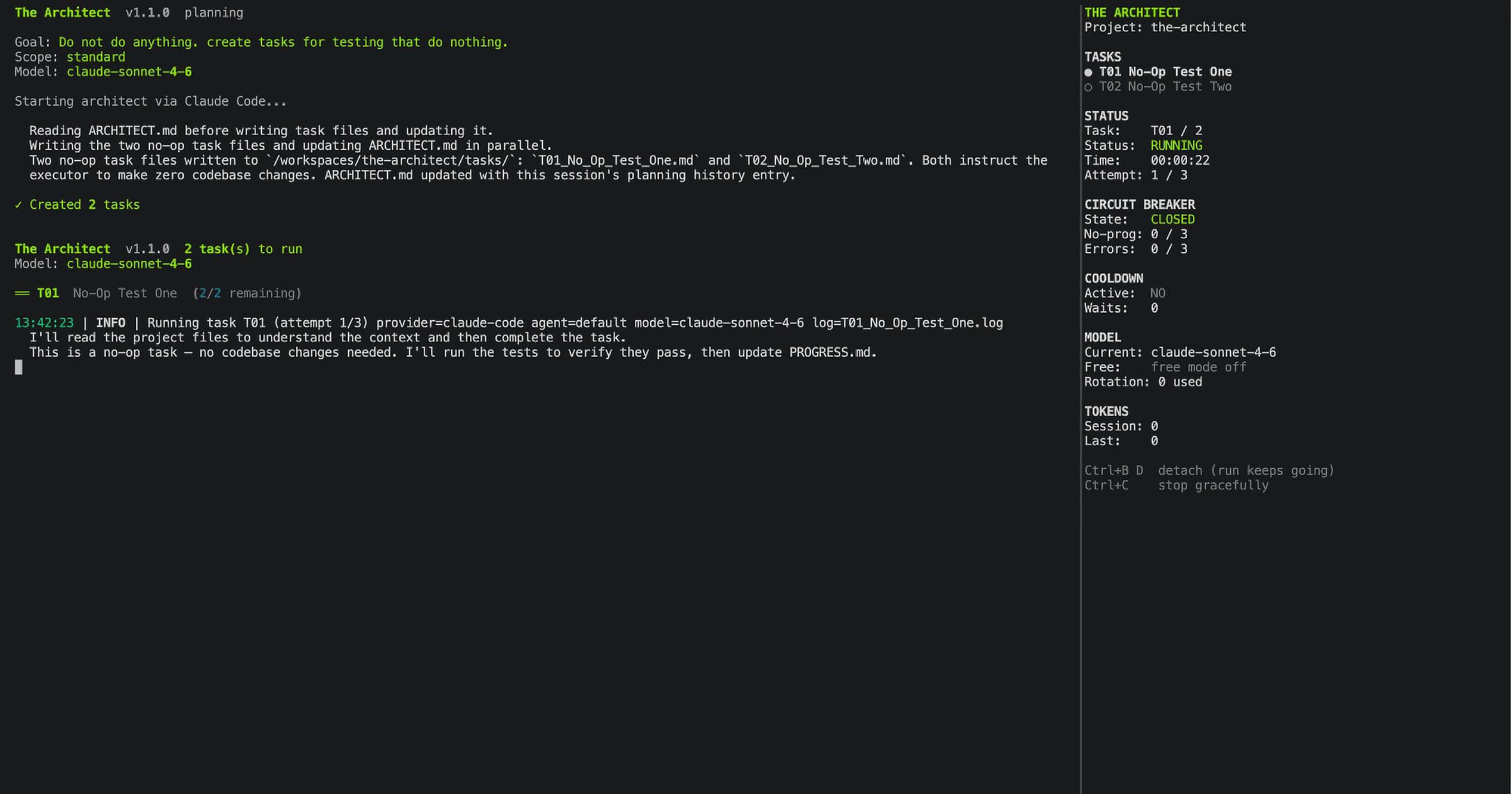
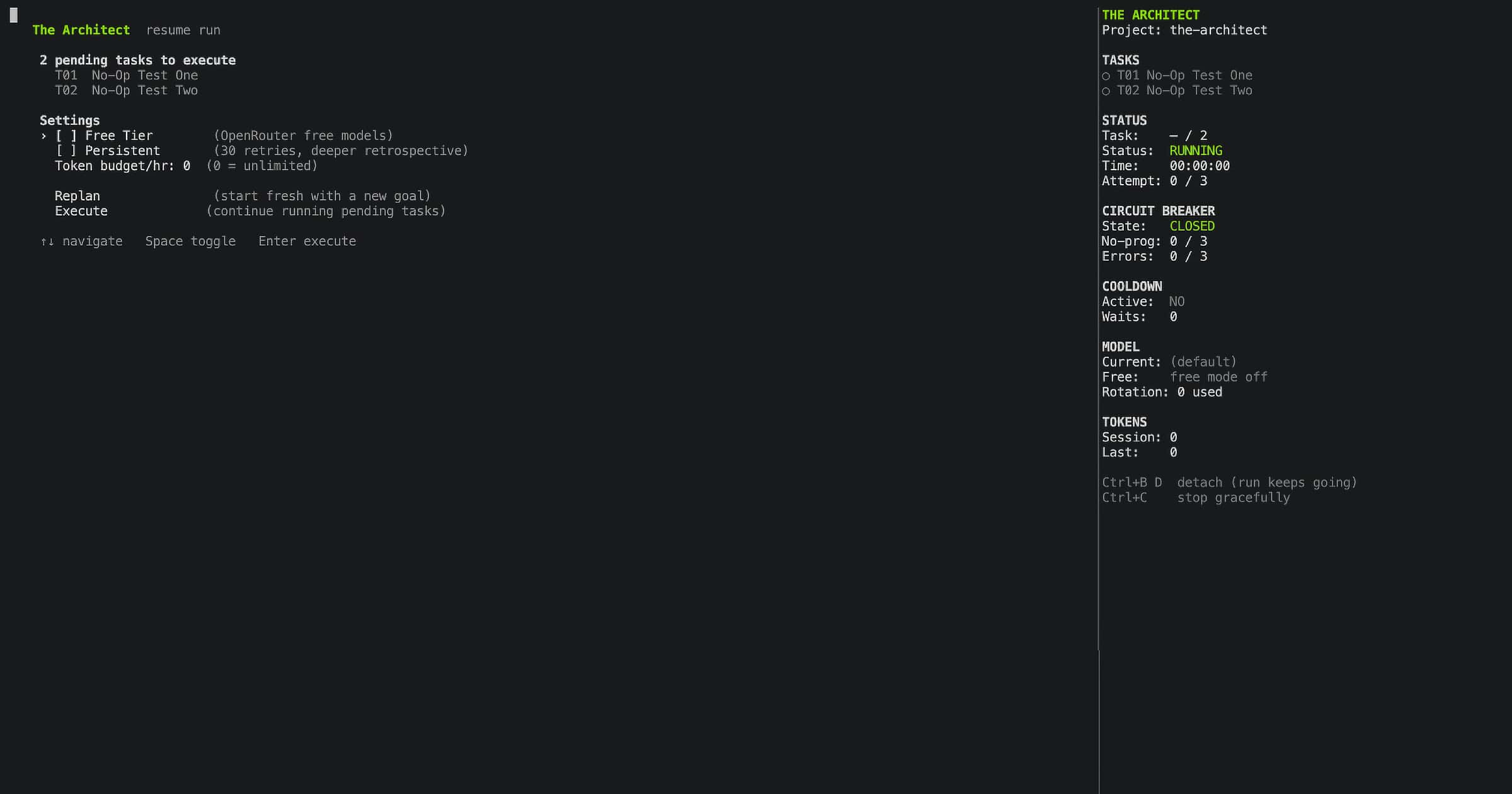
Screen 7: Resume, When Unfinished Tasks Exist
If you run architect and unfinished tasks from a previous session exist, The Architect shows them before doing anything else. From this screen you can continue execution, change settings, or go back to planning with a new goal. Nothing is lost and nothing runs without your confirmation.
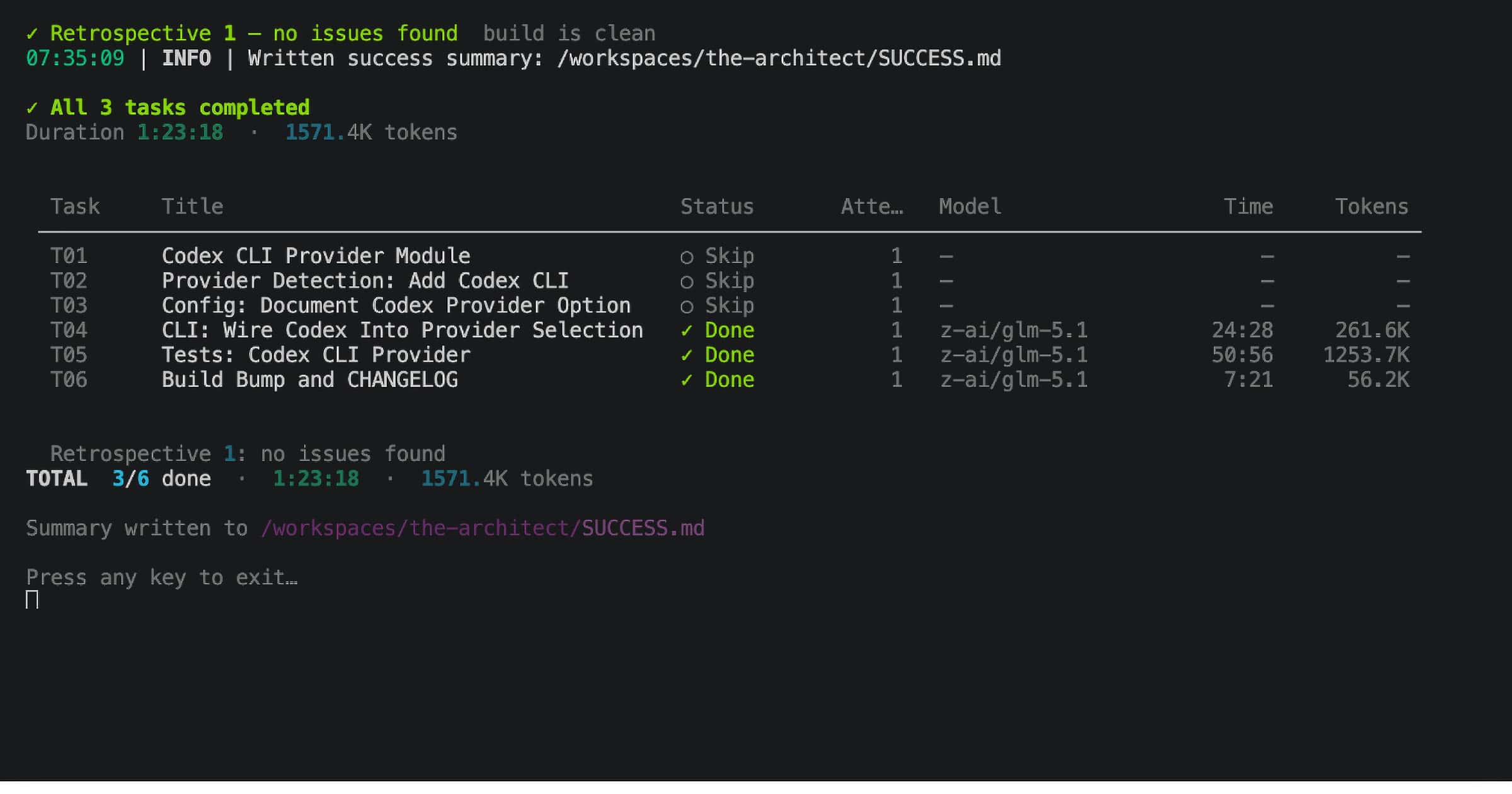
Screen 8: Run Summary
When execution completes, The Architect displays a final summary screen in the terminal before returning you to your shell. Tasks completed, total duration, retry count, rate limits hit, retrospective rounds, and token usage. The same data is also written to SUCCESS.md so you can review it later, but the screen is what you see the moment the run finishes.
Mechanism 1: Autonomous Planning
The first job is decomposing your goal into executable task files.
You don't write the tasks. The architect agent does. In the interactive flow, you type your goal into Screen 2. For CI or power-user workflows, you can pass it directly:
architect --plan --goal "add Stripe payment integration with webhooks and refund support"
The architect agent reads your goal, your project structure (auto-detected, more on this below), and any context files you've provided via --context. It produces numbered task files in the tasks/ directory:
tasks/
├── T01_stripe_models.md
├── T02_payment_routes.md
├── T03_webhook_handler.md
├── T04_refund_logic.md
├── T05_tests_and_docs.md
└── INSTRUCTIONS.md
Each task file is a structured instruction: goal, context, sub-tasks. Self-contained. Not a vague directive, but specific enough that the build agent can execute it without needing to ask questions.
You can also point it at a PRD, spec, or any document:
architect --plan --context PRD.md
architect --plan --context design/ --context SPEC.md
The architect agent extracts the goal automatically from ## Goal, ## Objective, or ## Requirements sections. In CI, set ARCHITECT_CONTEXT as an environment variable. The planning reads the file, extracts the goal, and produces tasks without any interactive prompts.
Scope: How Tasks Get Sized
At planning time, you choose a scope: simple, standard, or complex. This controls how the planner decomposes the goal.
At simple scope, a 10-feature goal becomes 15-20 narrow task files, each one a small focused operation. One function, one test, one file.
At complex scope, the same goal becomes 3-5 broad task files, each one a full subsystem.
Why scope matters for local GPU models.
People talk about local model context windows as if 128k means you can work like you would with Claude Sonnet. You can't. The number is theoretical. What matters is the reliable range, which is much smaller once you account for what's actually in that context.
Take Gemma 4 or Qwen 3.6 running on a local machine. You might have 40k, 65k, maybe 128k tokens on paper. But think about what fills that window during a real coding task: the base instruction, the codebase files the agent reads for context, the file it's editing, the test output, previous tool call results, and the response it's generating. For any non-trivial feature touching multiple files, especially in a monorepo or cross-repo scenario, you're looking at 20k-40k tokens of actual working context before the agent has written a single line.
At that point, 128k isn't enough for cross-repo or multi-component work. It's enough for isolated, focused, single-file tasks. That's not a limitation of the model. It's the physics of context windows on hardware that isn't a data centre.
The standard approach is to give the model the whole codebase and hope it figures out what's relevant. That's exactly wrong. It fills the window with noise and degrades output quality across the entire run.
The Architect's approach is the opposite. The planner, which runs on a frontier model with full context, decomposes the goal into task files scoped precisely for the execution model's reliable context range. Each task file contains only the specific files, constraints, and instructions that task needs. The execution model, your local Gemma 4 or Qwen, receives a clean narrow instruction that fits inside 15k-25k tokens. It doesn't need to see the whole monorepo. It needs to see the three files it's modifying and the tests it has to pass.
This is the mixed-model pattern: frontier model for planning and retrospective, local model for execution.
[architect]
# Local GPU model for execution (via OpenCode + Ollama or LM Studio)
standalone_mode = "local/qwen3:6b"

# Frontier model for planning, set at run time via --architect-model
# architect --plan --architect-model openrouter/google/gemini-2.5-pro
The planner runs once, online, with full codebase context. It produces 15 narrow task files. Then your local Qwen executes them one at a time, each in a clean context window, never overwhelmed. The retrospective reviewer runs on the frontier model too, because it needs to see the full picture to assess quality.
A model with a 30k context window can do real production work this way. Not synthetic benchmarks. Actual feature development, actual test writing, actual refactoring. The scope system is what makes it possible.
Project Structure Detection
Before creating task files, the architect agent needs to understand your project. The Architect detects this automatically:
- Repo type: single repo, monorepo, multi-repo, or untracked
- Languages: detected from signal files (
pyproject.toml→ Python,package.json→ JavaScript/TypeScript,Cargo.toml→ Rust,go.mod→ Go, and more) - Frameworks: Next.js, FastAPI, Django, Gin, Axum, React, Express, and more, detected from config files first then dependency scanning
- Component descriptions: pulled from
pyproject.tomldescription fields andpackage.jsondescription fields - Key dependencies: top 8 from each component's dependency list, with dev tooling filtered out
- Test and lint commands: auto-detected (
pytest tests/ -v --tb=shortwhen pytest is in deps,npm testwhen a test script exists, and so on) - Dependency graph: parsed from
docker-compose.ymldepends_on, package workspace configs, and local path dependencies
All of this goes into the planning prompt and into ARCHITECT.md. The architect agent knows your codebase before it writes a single task.
Mechanism 2: Execution with Live Streaming
Once tasks are planned, execution starts. In the interactive flow, this begins after Screen 4. From the command line:
architect
The runner discovers all pending task files, filters out anything already marked Done in PROGRESS.md, and executes them in order via the provider CLI. Claude Code or OpenCode, whichever you have configured.
Provider output streams directly to your terminal as shown in Screen 5. No piping, no reformatting. With OpenCode, structured JSON events are parsed to render tool calls with filenames and commands (→ write app/payments/models.py, $ pytest tests/ -v). With Claude Code, plain text output is displayed as-is.
Between tasks, there's a configurable pause (default: 10 seconds) to let file writes flush before the next task reads them.
The Execution Instruction
Every task gets an execution instruction composed of three parts:
-
The execution protocol. The rules the build agent must follow: how PROGRESS.md works, how to declare completion, what to update in ARCHITECT.md. A few hundred tokens. Minimal by design.
-
ARCHITECT.md content. The full accumulated project intelligence: permanent decisions, known constraints, lessons learned, best practices, and the enriched project structure. This replaces conversation history. The build agent reads architectural context from a file, not from a 40-turn chain.
-
The task-specific instruction. Project root, pointers to PROGRESS.md and the task file, and retry context if this is a re-attempt.
The build agent is explicitly instructed to update ARCHITECT.md when it discovers new constraints or lessons during execution. Project intelligence accumulates automatically.
Mechanism 3: Multi-Signal Completion Detection
This is where most AI coding tools fail. The Architect doesn't trust any single signal.
Four signals, in order of strength:
| Signal | How it works | Strength |
|---|---|---|
| Promise tag | Agent outputs <promise>TXX_COMPLETE</promise> in text |
Strong |
| PROGRESS.md | Task marked Done in the progress file |
Moderate |
| Clean exit | Provider CLI exited with code 0 | Weak |
| Progress signal | Text contains "all tests pass", "task is done" | Weak |
Decision rules:
- 2+ signals positive → Done. Unambiguous.
- Promise tag alone → Done. Strong enough on its own.
- PROGRESS.md alone → Done with a warning logged.
- Exit code alone → Not done. Providers exit 0 on timeout.
- Progress signal alone → Not done. Agents say "tests pass" before running them.
And the override: if the agent outputs any stuck signal anywhere in its text, "I'm stuck", "I can't proceed", "no clear path forward", "unable to resolve", that overrides every other signal. Two or more stuck patterns in one attempt triggers a stuck classification. A stuck agent claiming completion is hallucinating. This rule stops false completions dead.
Mechanism 4: Retry with Context Carry
When a task fails completion detection, it retries. Up to 3 attempts by default, 30 in persistent mode, with a configurable pause between attempts.
The key feature is carry_context. On retry, the previous attempt's context is summarised and injected into the new instruction:
- Files written or edited in the previous attempt
- Files read
- Bash commands run
- Test failures extracted from pytest output
The build agent on attempt 2 knows exactly what attempt 1 tried. It doesn't repeat the same mistake. It starts from where the previous attempt stopped.
This summary is parsed from the attempt's log file on disk, not from memory. If the process is killed and restarted between attempts, the context is still available.
Retry models let you fall back to a different model on each attempt:
[architect]
retry_model_2 = "openrouter/google/gemini-2.5-pro"
retry_model_3 = "openrouter/anthropic/claude-opus-4.5"
Attempt 1 uses your default. Attempt 2 switches to the retry model. Attempt 3 escalates further. Different models have different strengths. A task that Claude Sonnet gets stuck on may complete cleanly on Gemini 2.5 Pro.
Mechanism 5: The Circuit Breaker
Retry logic handles model failures. The circuit breaker handles something retries can't: failure patterns.
If an agent is failing the same way repeatedly, continuing to retry wastes tokens, burns budget, and sometimes makes things worse through confused context, partial writes, and contradictory state. The circuit breaker detects these patterns and stops the loop before it becomes expensive.
Three counters, all persisted to disk:
Counter 1: No-Progress
The agent ran but wrote zero files. Three consecutive attempts with no file writes: the circuit trips.
This catches agents that are confused about what to do. They generate text, read files, run commands, but don't make progress. Token burn with no output.
Counter 2: Same-Error
The agent produced the same bash error fingerprint across multiple attempts.
Fingerprinting strips file paths (/home/user/project/foo.py → <path>) and line numbers (:42 → :<N>), then normalises whitespace and lowercases. So "Error in /a/b/c.py line 42" and "Error in /x/y/z.py line 99" produce the same fingerprint.
This means the circuit breaker catches the same logical error, not just identical text. Three identical fingerprints in a row: the circuit trips. The agent is hitting the same wall with different syntax each time.
Counter 3: Token Decline
If attempt 3 uses less than 40% of attempt 1's tokens, the agent is giving up earlier each retry. Combined with any elevated counter: circuit trips.
This catches demoralised agents. They've hit a failure, they don't know how to fix it, and each attempt they generate less and less output before halting.
Circuit States and Recovery
CLOSED → (threshold hit) → OPEN → (cooldown period) → HALF_OPEN → (one test attempt) → CLOSED or OPEN
When the circuit opens, it chooses a recovery action based on what's available:
WAIT. Retry models still available, or some file progress was made. Let model rotation continue.
REPLAN. All models exhausted, zero file progress ever made on this task. The architect agent rewrites just the failing task:
=== TARGETED TASK REPLAN ===

Task T03 has failed repeatedly. Circuit breaker opened.
Fix this ONE task only. Do NOT touch any other task files.

Original task content: [...]
What was tried and what failed: no_progress=3, same_error=2, last_error=[...]
Current PROGRESS.md: [...]

Either rewrite T03 with corrected assumptions,
or split T03 into two smaller tasks.
Replan is attempted once per task. If the replanned task also fails, the circuit moves to WAIT.
COOLDOWN_WAIT. Rate limit detected. Pause for the required time (minimum 1 hour), no retry slot consumed, no circuit counter incremented. Resume automatically.
This is the mechanism that makes overnight runs safe. A stuck agent doesn't spin indefinitely. The circuit catches it, makes a decision, and either rotates or stops cleanly.
Mechanism 6: Rate Limit and Cooldown Handling
During a long unattended run, hitting rate limits is inevitable. The Architect handles them without your intervention.
Detection patterns:
- HTTP 429 or 529 exit codes
- Text patterns:
"rate limit","too many requests","quota exceeded","out of extra usage","credit balance is too low","overloaded","temporarily unavailable", and more, covering both OpenCode and Claude Code output formats
When a rate limit is detected:
- The run pauses
- No retry slot is consumed
- No circuit breaker counter is incremented
- The cooldown duration is determined: minimum 1 hour, or longer if the provider's message suggests it
- The run logs progress every 60 seconds so you can see it's still alive
- After the wait, execution resumes from the same attempt
Cooldown state is persisted to disk. If the process is killed during a wait and restarted, it reads the remaining wait time from circuit.json and continues the pause from where it left off.
For OpenCode users with OpenRouter, free mode handles this differently: instead of waiting, it rotates to the next available free model immediately. Mid-stream. No restart needed.
Mechanism 7: Free Tier Model Rotation (OpenCode + OpenRouter)
If you have OpenCode configured with OpenRouter, The Architect can run entirely on zero-cost models.
architect --free
On startup:
- Fetches all models from
https://openrouter.ai/api/v1/models - Filters for models where
pricing.prompt == "0"ANDpricing.completion == "0" - Excludes non-text-output models (audio generators, etc.)
- Sorts by context length descending, so larger context models are tried first
- Adds
openrouter/prefix for OpenCode compatibility
During execution, when a free model hits a rate limit mid-stream, the rotator switches immediately to the next available model. No restart. No retry slot consumed. The task continues with the new model from where it left off.
When a model returns "model not found" or "not available for this provider", it's marked as permanently unusable and skipped. This is a different failure mode from a rate limit.
When all free models are exhausted, execution falls back to your default model from opencode.json.
The tradeoff is honest: free models are smaller and slower. On a 10-task goal, expect roughly 3x the wall-clock time compared to Claude Sonnet. Use it for non-urgent work or when budget is the constraint, not for a production fix you need in an hour.
Free mode is not available with Claude Code. Claude Code routes through Anthropic's API directly, with no OpenRouter integration.
Mechanism 8: The Retrospective Reviewer
After all tasks execute, a separate reviewer agent runs. This is not the same agent that wrote the code. It's an auditor.
The reviewer reads:
PROGRESS.md, full content including failed states- All task files, to understand what was planned
- The actual code written or modified
- The project context
Then it runs your test suite.
If it finds issues, including failing tests, incomplete requirements, missing edge cases, code quality problems, or inconsistencies, it creates R-prefixed fix-up tasks:
tasks/
├── T01_stripe_models.md           (done)
├── T02_payment_routes.md          (done)
├── T03_webhook_handler.md         (done)
├── R01_missing_webhook_test.md    (new, from reviewer)
├── R02_refund_edge_case.md        (new, from reviewer)
These R-tasks run through the full execution pipeline with retry, circuit breaker, and completion detection, exactly like regular tasks. After R-tasks complete, if retrospective_rounds = 2 (persistent mode), a second reviewer pass runs and reviews the fix-up work.
The reviewer is explicitly forbidden from:
- Modifying existing T-prefixed task files
- Rewriting
PROGRESS.md - Creating fix-up tasks when the work is clean (silence is success)
In persistent mode with two retrospective rounds, the flow is:
Execution → Review 1 → Fix-up execution → Review 2 → Fix-up execution → Done
This is closer to how production engineering actually works: write, review, fix, review again.
Mechanism 9: Persistent Project Memory
This is the mechanism that changes the nature of long-term autonomous work.
Every production system I've built has the same memory problem: the AI has no recollection of decisions made last session. You re-explain the same constraints. You re-discover the same failure modes. You re-make the same trade-offs.
The solution is a file called ARCHITECT.md. It accumulates across every session and is read by every agent before they do anything.
What it contains
Project Structure (rewritten fresh on every planning session):
- Repo type, detected languages, frameworks, and inferred component roles
- Component descriptions from pyproject.toml and package.json
- Key dependencies, test commands, lint commands
- Dependency graph between components
Permanent Decisions (append-only):
database: SQLite, lightweight, no server needed, no ops overhead. Decided T01.
Known Constraints (append-only):
Python 3.9+ required. httpx async breaks on 3.8. Discovered T04 attempt 2.
Lessons Learned (append-only):
Don't skip test execution before marking PROGRESS.md Done. T07 declared complete with 3 failing tests. Always run pytest before promise tag.
Best Practices (append-only):
Use typed Pydantic models for all API request/response schemas. Avoids silent type coercions in production.
Planning History (auto-appended by The Architect after each plan):
2026-04-19: "add Stripe integration", 5 tasks, standard scope
How it flows through the system
Every planning session: the architect agent reads ARCHITECT.md first, before reading anything else. It's the highest-priority context. The planner knows every decision and constraint made in previous sessions before writing a single task.
Every task execution: the build agent receives the full ARCHITECT.md content in its instruction. It reads architectural context from a file, not from conversation history. The instruction explicitly tells it to update ARCHITECT.md when it discovers new constraints during execution.
Every retrospective: the reviewer reads ARCHITECT.md and is instructed to update it with cross-task patterns and quality findings.
All writes to ARCHITECT.md use atomic operations (temp file + os.replace) so readers never see partial content.
The result: After 50+ builds on The Architect's own codebase, ARCHITECT.md contained 23 architectural decisions and 11 lessons learned. None written manually. The agents built this memory while building the project. Session 10 doesn't repeat session 3's mistake. It reads the lesson from the file.
Commit ARCHITECT.md to git. It's the project's long-term memory and it improves with every session.
Mechanism 10: Progress Tracking and Session State
PROGRESS.md is how The Architect tracks which tasks are complete and what to run next. Every task reads it at the start and updates it at the end.
Format:
## Overall Status

**Tasks completed:** 3
**Next task to run:** T04

## Task Log

| Task | Title | Status | Completed |
|------|-------|--------|-----------|
| T01 | Stripe models | Done | 2026-04-19 |
| T02 | Payment routes | Done | 2026-04-19 |
| T03 | Webhook handler | Done | 2026-04-19 |
| T04 | Refund logic | Pending | |

## Permanent Decisions

| Decision | Value | Reason | Task |
|----------|-------|--------|------|
| payment_provider | Stripe | client requirement | T01 |
The runner detects task state from two specific lines: **Tasks completed:** N and **Next task to run:** TXX. Task Done status is detected by grepping TXX.*Done.
The Architect always writes PROGRESS.md itself, never delegated to an agent. This guarantees it's always at the correct path and in the correct format.
Mechanism 11: Token Budget
For overnight runs, cost control matters. The token budget prevents runaway spend.
[architect]
token_budget_per_hour = 500000   # ~5 Claude Sonnet calls per hour
The HourlyTokenBudget class tracks usage against a rolling 1-hour window. After each task completes, tokens are recorded. When the hourly budget is exceeded, execution pauses until the window resets, then resumes automatically.
Budget pauses don't consume retry slots. They don't affect circuit breaker state. A single Claude call can use 100k+ tokens, so calibrate accordingly. 500000 gives roughly 5 calls per hour, enough for steady progress without uncapped overnight cost.
Set it in architect.toml before you start a long run. The run summary screen (Screen 8) and SUCCESS.md both show actual token spend when the run completes.
Mechanism 12: Overnight Safety, Everything Together
Here's what a safe, unattended overnight run looks like:
[architect]
persistent = true                 # 30 retries, 2 retrospective rounds
token_budget_per_hour = 500000
cooldown_detection = true         # default
circuit_enable_replan = true      # default
architect --plan --goal "refactor authentication layer to use JWT + refresh tokens"
architect
# Go to sleep
While you're gone, the system handles:
- Task fails on attempt 1. Retry with context carry, attempt 2 passes.
- Rate limit hits on T06. Cooldown wait, no retry slot consumed, resumes in an hour.
- T09 stuck in same-error loop. Circuit trips after 3 identical fingerprints. REPLAN. Architect rewrites T09. New T09 passes on attempt 1.
- All tasks complete. Retrospective reviewer runs. Finds missing test in T04. Creates R01. R01 executes and passes. Second reviewer pass finds nothing. Done.
- Process killed at 3am from a power blip. Restart runs
architect. Reads circuit.json and PROGRESS.md. Resumes from T11.
You wake up to Screen 8, the run summary, displayed in the terminal. The same data is written to SUCCESS.md for later review:
Result: ✓ All tasks completed
Tasks: 12/12 done
Duration: 6:43:12
Retries: 4 across 12 tasks
Rate limits hit: 1 (T06)
Retrospective: Round 1, 1 issue found (R01). Round 2, clean.
That's the whole point. You made the architecture decisions before bed. The Architect executed them overnight.
The Dog-Food Story
The Architect was built using itself.
During development, it planned and executed tasks against its own codebase. The architect agent built the architect agent. The circuit breaker was tested by the circuit breaker. The retrospective reviewed the retrospective.
At task T47, the circuit breaker tripped. The build agent had failed on the same FileExistsError three consecutive retries, same logical pattern, different file paths, different line numbers. The fingerprinting logic normalised both away and recognised the same failure. Circuit opened. Chose REPLAN. Sent a targeted rewrite of T47 only.
T47 was the task implementing the lock file. The Architect caught a bug in its own lock file implementation using its own circuit breaker.
I found this in the build logs the next morning.
The build counter in version.py (__build__) increments on every completed agent operation and never resets. The current version is v1.0.0 (build 10042). That number is the honest record of how many autonomous operations it took to build and stabilise this tool. Every one verified by multi-signal completion detection and at least one retrospective pass.
What It Doesn't Do (Honest Limits)
It doesn't write better code than your underlying model. If Claude Code gets confused by your codebase, The Architect's orchestration layer won't fix that. The quality ceiling is the model. The Architect raises the floor, making sure the model actually finishes, correctly.
A bad goal still produces bad tasks. If your goal is underspecified, the architect agent produces vague task files. Invest time in a clear --goal or a well-structured --context file. Garbage in, garbage out, at all 12 mechanisms.
The retrospective isn't a substitute for engineering judgment. It catches test failures and incomplete requirements. It won't catch architectural drift, accumulating technical debt, or design decisions that are locally correct but globally wrong. It's a quality gate, not a code review.
Local models can't do cross-repo work, even with The Architect. Scope calibration and context minimisation let a 30k-context model execute isolated, focused tasks reliably. But cross-component work, where a task genuinely requires deep context from three different repos simultaneously, still needs a model with a large reliable context window for that specific task. The Architect reduces how often you hit this ceiling by keeping tasks narrow. It doesn't eliminate the ceiling.
Token counts are unavailable with Claude Code. Claude Code outputs plain text, not structured JSON events. SUCCESS.md shows 0 for token totals when using Claude Code. Use OpenCode if token tracking matters.
Free mode is slower. Free OpenRouter models are smaller. On a 10-task goal, expect roughly 3x the wall-clock time compared to Claude Sonnet. Appropriate for non-urgent work. Not appropriate for a production incident.
Get It
pip install the-architect
Requires Python 3.11+ and at least one of Claude Code, OpenCode, or Codex CLI:
# Claude Code
npm install -g @anthropic-ai/claude-code

# Or OpenCode
npm i -g opencode-ai
First run:
# Initialise (creates AGENTS.md and architect.toml)
architect init

# Then just run architect — it opens the interactive menu
architect
Running architect opens the interactive CLI. It walks you through provider selection, planning, model selection, and feature configuration before anything executes. No flags needed. The --plan, --goal, --headless, and other flags shown throughout this article are shortcuts for CI pipelines and power users who want to skip the menus.
Full documentation at github.com/iNetanel/the-architect.
Every subcommand has a useful --help. The README has the full feature table, CLI reference, and configuration options.
If you're running local models and want to share what's working, open an issue. Context minimisation patterns for sub-10B models are still being refined and real production data is valuable.
If you find a failure mode I haven't covered, open a PR. The Architect can review it.
About the Author
Netanel Eliav builds production AI systems. Agentic workflows, RAG pipelines, LLM infrastructure, and the orchestration layer that makes autonomous development actually work at scale. Based in London, shipping globally.